
Bring in the lease
Create a lease record or start with Smart Upload. AI-assisted lease extraction helps bring details from the document into the program. Review the extracted information against the original before accepting it.
Family Admin Hub · Rental workspace
A signed lease is the start of an ongoing record. Keep the agreement, tenant details, rent terms and renewal history connected to the property and unit they belong to, with AI-assisted import to help reduce retyping.
Private development · Public sign-up is not open
A practical walkthrough
These steps describe the current private-development workflow. Package access and permissions apply.
Create a lease record or start with Smart Upload. AI-assisted lease extraction helps bring details from the document into the program. Review the extracted information against the original before accepting it.
Keep tenant records, the property and unit, lease dates and rent terms in the same workflow. The lease detail brings its tenant ledger, documents and related activities together.
Use the rental dashboard and expiration report to identify leases needing attention. Record a renewal and follow the links between the previous lease and its renewal, keeping the earlier agreement in the history.
Inside the actual program
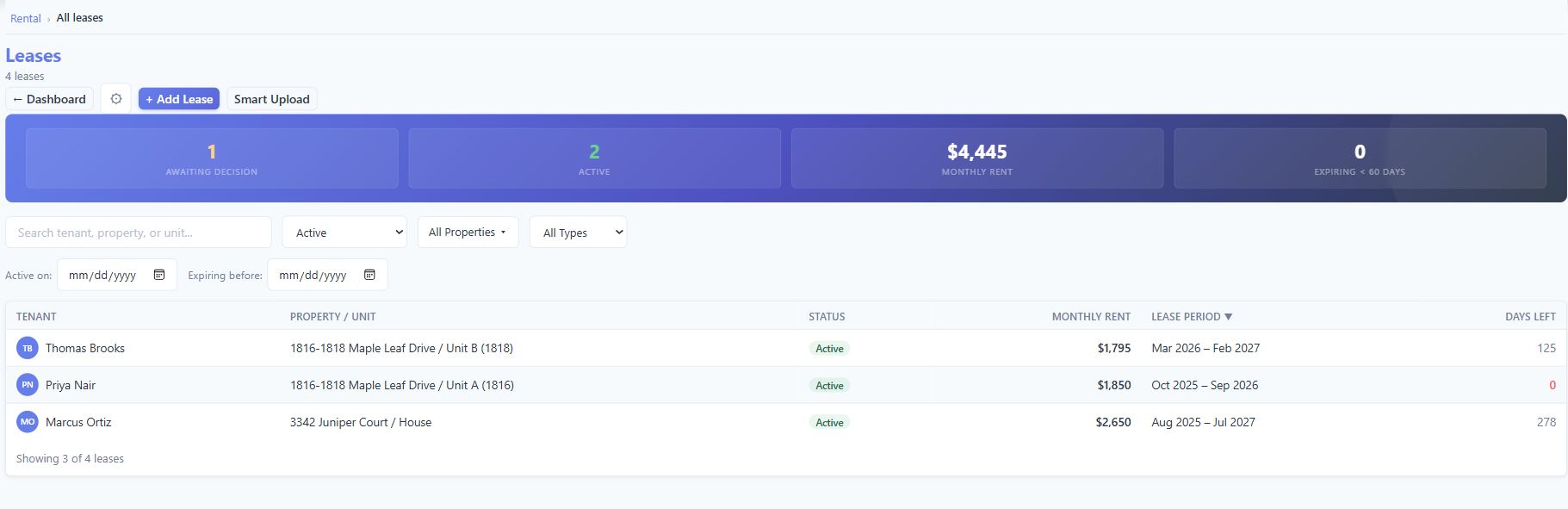
The lease list provides the portfolio view: which tenant and unit each agreement covers, its dates and its recorded status. Open a lease for the details behind the row.
The details that matter
Keep the supporting information close to the work, rather than rebuilding the story from separate files.
Smart Upload is the starting point for importing a lease document. Treat extracted details as information to check, rather than a legal interpretation or an automatic approval. The source agreement remains the reference for the terms you accept.
Keep the people on a lease connected to their tenancy. The tenant ledger can show who made a payment and the rent split recorded between roommates. That split does not change the full rent owed by the lease.
See active leases, upcoming starts and expirations. Renewal links connect the earlier and later lease records, so a new agreement does not erase the one it follows. An expiration alert is a prompt to review the situation, not evidence that a legal notice has been delivered.
Keep rent changes and tenant ledger activity with the lease. Review charges and recorded payments, then use rent roll and collections reports for the portfolio view. Recording rent received is different from collecting a payment online.
Keep the lease agreement and supporting documents in the rental workflow. In the wider Documents workspace, the same file can also be attached to other related records, helping you find it without relying on one folder alone.
Move from a lease to the relevant property and unit. The wider program organizes ownership, entities, trusts and family documents alongside rental operations; capabilities and access vary by module and package.
A worked example
When a tenancy continues under a renewal, the earlier lease remains a separate record connected to its successor. Review the old and new periods and terms through those links, with tenant and property context still available. Review the actual agreement before entering a renewal decision; the program does not replace legal review.
See how documents connect to related records ↗Availability and scope
The product is in private development, with package and permission requirements. The Android Tenant Portal is in private testing and requires a landlord invitation. Online tenant payments, tenant screening and electronic lease signing are not offered here as available features. No legal compliance or extraction-accuracy guarantee is implied.
Useful answers
Yes. The private-development workflow includes Smart Upload for AI-assisted lease extraction. Review extracted information against the original document before accepting it. This assists data entry; it is not legal advice or a guarantee that every clause is understood correctly.
Use the rental dashboard and lease expiration report to identify approaching dates and agreements needing attention. The renewal workflow links the earlier and later lease records. Reviewing an alert or recording a renewal does not itself serve a legal notice on a tenant.
Yes. Renewal links connect separate earlier and later lease records. Follow those links to review the lease history instead of overwriting the earlier agreement with new terms.
Yes. A lease can have multiple tenants. The tenant ledger supports recording who paid and a rent split between roommates. The split is informational: the lease still owes its full rent, and it does not create separate individual charges.
Those are not offered as available features on this page. The current rental workflow keeps lease and tenant records, tracks charges and records payments. The Android Tenant Portal is in private testing with landlord-controlled invitations.
Public sign-up is not open. Contact the team to discuss your rental workflow and availability. The interface shown uses fictional demonstration records and may evolve before release.
Built around owners and families
Tell us what you manage and which parts you want to bring together.
Private development. No public launch date announced.