
Choose the property
Open Expenses from Rental to see your rental properties together, or use a property’s Expenses tab to focus on one building. Choose a unit for a specific apartment or keep a shared cost at building level.
Family Admin Hub · Rental workspace
Track what each rental property costs, from a repair receipt to a bill due next month. Keep property, unit, vendor and expense details together, then review the records by property or across your rentals.
Private development · Public sign-up is not open
A practical walkthrough
These steps describe the current private-development workflow. Package access and permissions apply.
Open Expenses from Rental to see your rental properties together, or use a property’s Expenses tab to focus on one building. Choose a unit for a specific apartment or keep a shared cost at building level.
Enter the vendor, date and expense lines. Record an already-paid receipt or a bill to pay later. A bill can have several categories and units within the same property; partial payments can be recorded as they arrive.
Review recorded expenses by property, vendor, rental expense category or month. Choose a when-paid or when-billed view and export the expense lines to CSV for further review.
Inside the actual program
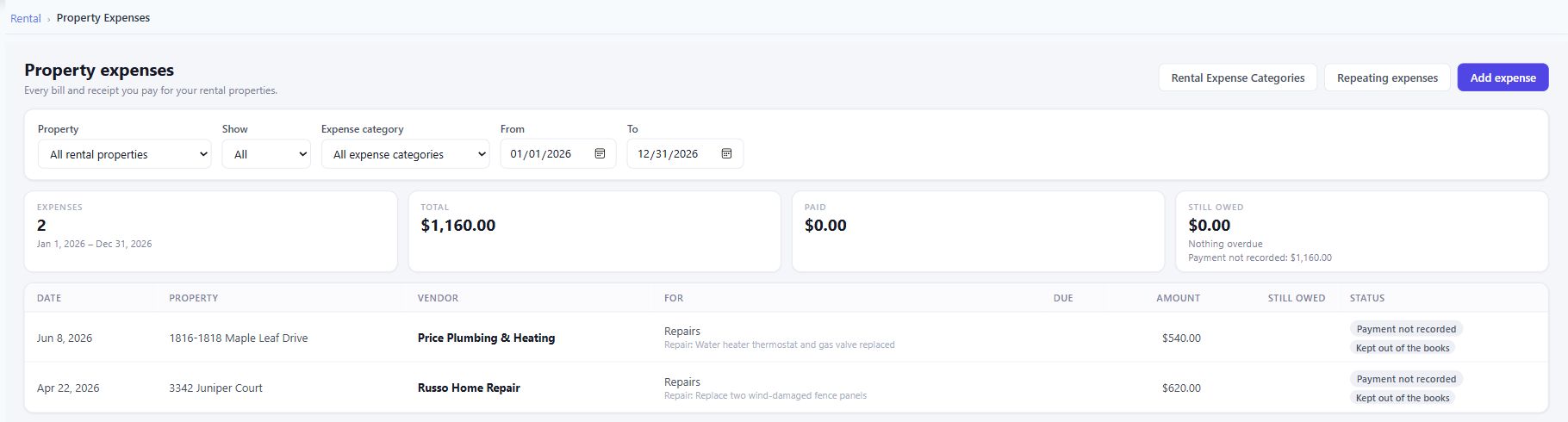
Two fictional property repairs show how the workspace keeps each cost with its property, vendor and explanation. Payment status stays visible alongside the expense.
The details that matter
Keep the supporting information close to the work, rather than rebuilding the story from separate files.
A paid receipt and a bill due later are different records of the task. Keep the due date and payment history with the expense, so a part-paid bill can be distinguished from one fully paid. Recording a payment does not send money to a vendor.
Set up a repeating expense for a fixed cost such as a regular landscaping service. Due bills are created when you save the schedule or open Expenses or Rental Reports, within package limits. Review the generated bills alongside the rest of your property costs.
For a changing utility bill, leave the repeating amount blank. A reminder waits for you to enter the actual bill, match one already recorded, or skip the occurrence. This keeps the reminder useful when the amount changes from month to month.
Group property costs by category, vendor, property or month and choose when-paid or when-billed reporting. The separate Rental Reporting page covers the full report workspace: rent roll, collections, aging, payment timing, operating income and year-end review.
Expense recording and expense reports belong to the Rental workflow. Supported expenses can also post to optional Bookkeeping after the required setup, category matching and permissions. Automatically generated repeating bills wait for an explicit Post to books step.
Keep an invoice or receipt with its expense record. The wider Documents workspace also lets you organize files in folders and attach a document to related records such as a property, entity or trust.
A worked example
In the demonstration above, a water-heater repair belongs to Maple Leaf Drive and a fence repair belongs to Juniper Court. The screen shows each vendor, explanation and amount separately. Property, vendor, explanation and payment status remain available together when you review the cost.
See how documents connect to related records ↗Availability and scope
Family Admin Hub is in private development. Each bill currently belongs to one property; dividing a single invoice across several properties is not available in this workflow. Package availability applies. Expense exports support review, not a promise of tax filing, tax advice or automatic vendor payments.
Useful answers
Yes. Rental expense recording and expense reports work within the Rental package and permissions. Posting supported expenses into Bookkeeping is a separate optional connection with its own setup and access requirements.
Yes. Add separate lines for the different costs, with a rental expense category and optional unit on each line. All lines currently belong to the same property; one invoice cannot be divided across different properties in this workflow.
Use a repeating reminder with no fixed amount. When the bill arrives, enter its actual amount, match a bill already entered, or skip that occurrence. Fixed repeating expenses generate due bills when the expense screens or reports are opened, within package limits.
Yes. Review recorded expenses by property, vendor, category or month, choose when-paid or when-billed reporting, and export expense lines to CSV. Review the selected period and basis before sharing the figures with an accountant.
No. Recording a payment stores a record of a payment. It does not initiate a bank transfer or send money. Likewise, marking a repeating expense as paid automatically records that payment; it does not perform the payment.
No. The product is in private development and public sign-up is not open. Contact the team to discuss the workflow and availability. The screenshot uses fictional demonstration records.
Built around owners and families
Tell us what you manage and which parts you want to bring together.
Private development. No public launch date announced.