All-in-one family administration

Rental property
management software.
The whole picture.

Property management software for landlords and families managing their own rentals. Bring leases, rent tracking, maintenance and reports into the same program as your bookkeeping, entities, trusts and family records.

In private development · Built around owners and families

A clearer starting point

Your rental day,
in view.

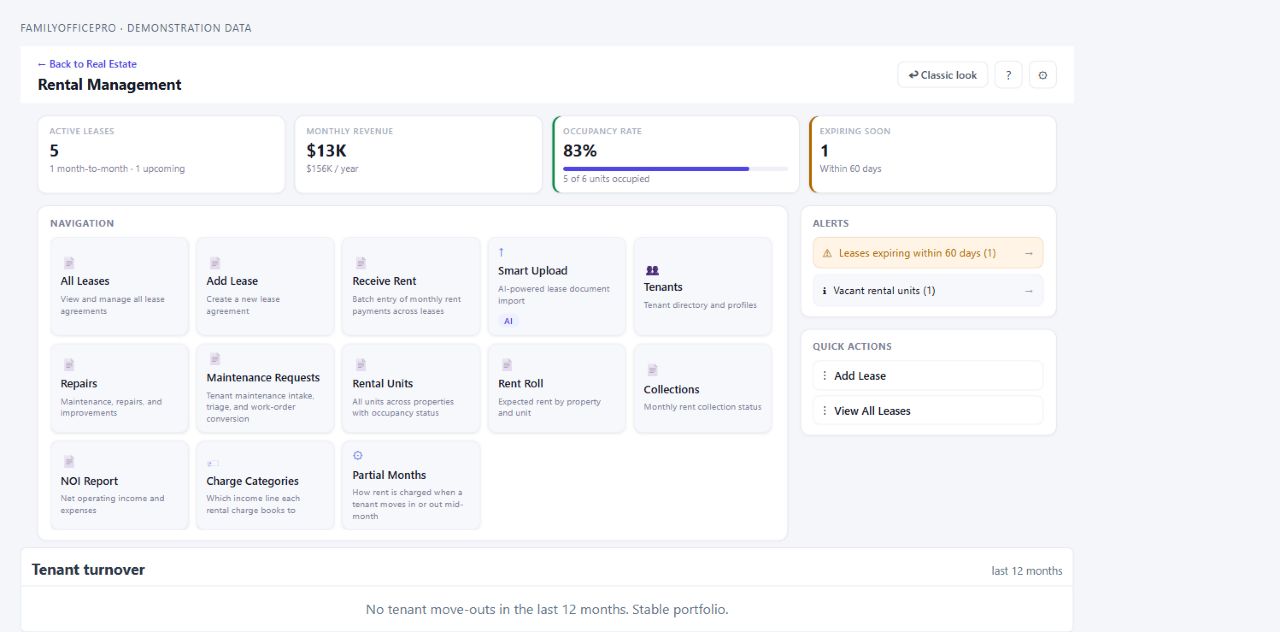
See the active leases, rental revenue, occupancy and upcoming expirations together. Then go straight to the lease, tenant, repair or report that needs your attention.

FamilyOfficePro · Rental managementProduct preview
Rental Management dashboard with active leases, monthly revenue, occupancy, expirations, operational tools and alerts. Demonstration data.
Actual FamilyOfficePro interface, shown with demonstration data.View full size

The work behind every property

Landlord software,
from lease to renewal.

Track rent, care for the property and keep the records behind each decision. These are the rental workflows being brought together in Family Admin Hub.

01

Leases, tenants & renewals

Keep lease terms, tenant records, rent changes and renewal history with the right property and unit. See active leases, upcoming starts and expirations from the rental dashboard.

One place for the life of a lease.
02

Rent tracking & tenant ledgers

Review charges, record payments and follow each lease’s balance. Batch rent entry helps with the monthly routine; tenant-level payment records help when roommates pay separately.

Know what was charged and what arrived.
03

Deposits, credits & billbacks

Track security deposits, deductions, refunds and tenant credits. Keep reimbursable expenses and billbacks associated with the lease, so the details behind a balance remain understandable.

Keep the explanation beside the amount.
04

Rental property maintenance

Track maintenance requests, notes and photos, then move requests into work orders. Property maintenance software within the rental workspace keeps repairs, vendors and related costs connected to the property.

Follow the issue through to the work.
05

Property inspections

Document rental condition with room-by-room checklists, photos, ratings and signatures. Inspection reports become a useful record for move-in, move-out and ongoing property care.

Give condition records a clear home.Explore the inspection companion
06

AI lease extraction

Smart Upload helps bring information from lease documents into the program. Review extracted details before accepting them, with the original document available for reference.

Less retyping. A deliberate review step.
07

Appliances & replacement history

Record appliances by property or unit, including make, model, serial number, purchase details and warranty dates. Keep the history when equipment is replaced or taken out of service.

Know what is there, and what came before.
08

Rental property depreciation

Keep property, improvement and eligible appliance records connected to depreciation workflows. Appliance details can carry into the depreciation system when the required cost, dates, ownership and package access are in place.

Connect the asset record to its accounting life.
09

Tax escalations & vendors

Record a lease’s tax escalation terms and calculate the tenant’s share of an increase over the tax baseline. Keep vendor records available for the repairs and expenses that support the property.

Keep recurring details organized.

Rental income, with context

Rent roll software.
See every unit clearly.

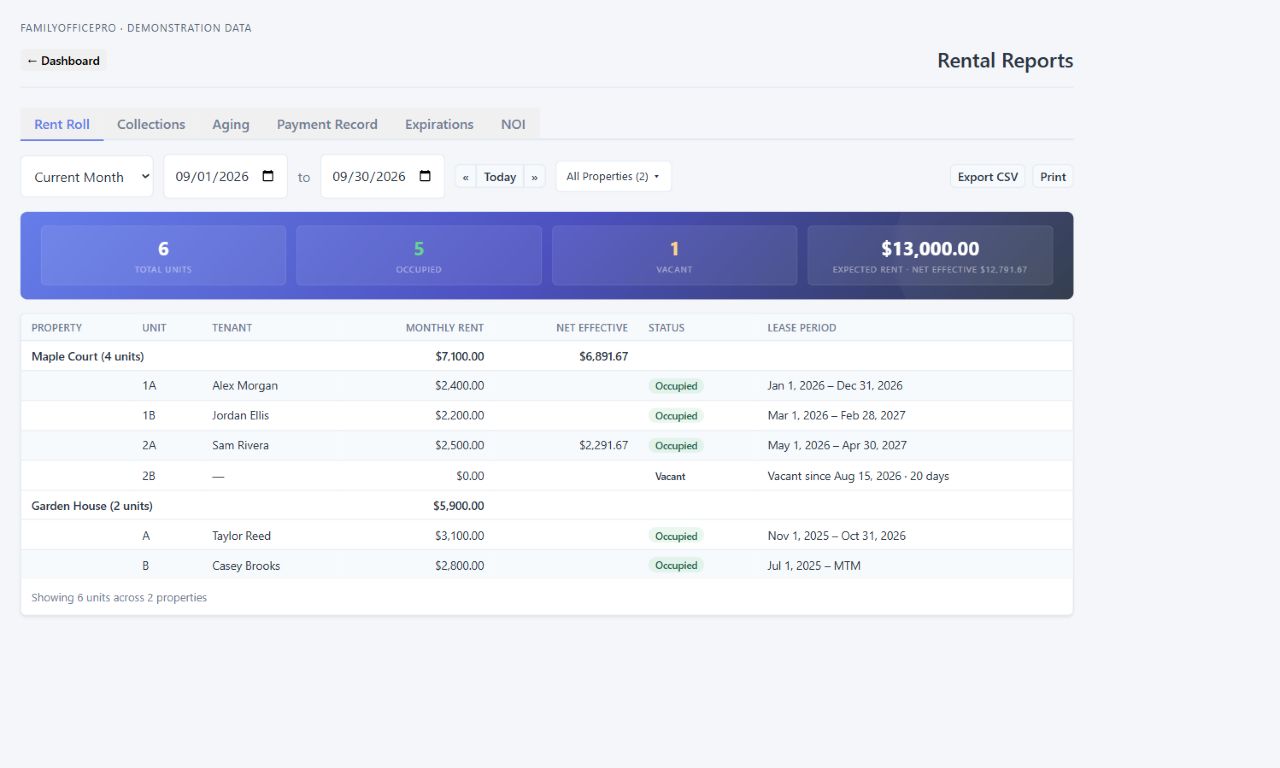
See tenants, monthly rent, vacant units and lease periods grouped by property. The rent roll example below shows how a concession changes net effective rent, alongside the details behind the portfolio totals.

FamilyOfficePro · Rental reportsProduct preview
Rent roll grouped by property, showing tenant names, monthly and net effective rent, occupied and vacant units, and lease periods. Demonstration data.
Actual FamilyOfficePro interface, shown with demonstration data.View full size
01 / PORTFOLIO

Rent roll & lease expirations

Group units by property. Review rent, concessions that change net effective rent, vacancy and lease dates. Use the expiration report to focus on upcoming decisions.

02 / COLLECTIONS

Balances & payment history

Review collections, overdue balances by age and payment records. Export report rows to CSV or open a clean version for printing and review.

03 / PERFORMANCE

Income & operating expenses

Review net operating income with cash or accrual views and a chosen reporting period. Keep the report’s scope in view when discussing results with an accountant.

Optional connected bookkeeping

Rental property accounting software, connected.

Supported rental transactions can post to the program’s bookkeeping system, with setup and category mapping connecting rental activity to the books. Registers, journals, vendors, reconciliation and depreciation sit within the wider platform.

That connection is especially useful when a family manages property alongside separate entities or trusts. Bookkeeping is optional; configuration and package availability apply.

Explore the connected bookkeeping platform

The Family Admin Hub difference

A rental belongs to
a bigger story.

A building may belong to an LLC. That LLC may be owned by a trust. There are people, accounts, loans, insurance policies and documents behind it. Our all-in-one approach puts rental administration inside that wider family picture.

Properties & rental operations

Properties, units, leases, tenants, tax escalations, inspections, appliances, maintenance, repairs, valuations and improvements.

Bookkeeping & cash flow

Account registers, journals, categories, vendors, reconciliation, depreciation and cash-flow tracking.

People & organizations

Family members, contacts, organizations and the professionals involved in family administration.

Entities & trusts

Company records, ownership relationships, trust records and the people connected to them.

Accounts & investments

Banking and investment accounts, financial institutions, businesses and investment holdings.

Loans & obligations

Liabilities, loan records and promissory notes alongside the wider asset picture.

Estate & future planning

Estate documents, planning organization, retirement planning and compensation records.

Documents, protection & follow-through

Document vault, links, cloud documents, AI extraction, insurance records, compliance tracking and tasks.

The program’s broader scope, currently in private development. Capabilities and connections vary by module and package.

Meet the wider platform

Built around the owner

Organized for today.
Useful for the next conversation.

Whether you manage a rental personally or coordinate a family portfolio, clear records make the next discussion easier—with a family member, property professional, accountant or attorney. Family Admin Hub is being built to keep those records and relationships understandable as the family’s needs evolve.

A few useful answers

Rental management,
explained.

Who is this rental management software being built for?

Family Admin Hub is being built for owners and families managing their own properties, including portfolios held personally or through entities and trusts. The rental workspace addresses daily property work while the wider program organizes the family’s other records and financial relationships.

Is rental management a separate program?

Rental management is part of the all-in-one Family Admin Hub platform. The broader system brings together properties, finances, people, entities, trusts and documents. Packages and optional bookkeeping determine which capabilities are available; public pricing has not been announced.

What is a rent roll, and what does the report show?

A rent roll is a snapshot of rental units and their monthly rent. The program’s report groups units by property and shows tenants, stated rent, net effective rent when a concession changes it, occupancy and lease periods. It also identifies vacant units. The rent roll example above shows the actual report using demonstration records.

Can I export a rent roll for review?

Yes. Rent roll report rows can be exported to CSV or opened in a clean version for printing. Review the property, unit, tenant, rent and lease-period details together when preparing for a conversation with an accountant or property professional.

How are rental maintenance requests tracked?

Maintenance requests can include notes and photos, with status tracking and a path into work orders. Repairs, vendors and related costs stay in the property workflow. The separate tenant portal is planned and is not currently available.

Can rental records connect to bookkeeping?

Yes. The rental workflow includes posting supported rental transactions to the optional bookkeeping system. Setup and category mapping determine how those entries reach the books. Rental bookkeeping is part of the wider accounting program, which is intended for individuals and relatively simple family entities and trusts; it is not a promise to replace every business accounting system.

Can I organize properties owned by LLCs and trusts?

The wider program includes people, entity, trust and property ownership records. That context helps an owner organize the records behind a portfolio and prepare for conversations with their advisors. Recording an ownership structure does not itself create legal asset protection or an estate plan.

Will there be a tenant portal?

Yes. A tenant portal is planned as another part of the rental experience. It is not currently available. The existing rental workflow records and tracks payments; tenant online payments, screening and electronic lease signing are not offered as available features on this page.

Can I sign up today?

Family Admin Hub is in private development. There is no public sign-up or announced launch date yet. Contact the team to discuss your rental workflow, ask about the product and learn about availability. The screenshots show the current interface with demonstration data; capabilities may evolve before public release.

Start with your rental workflow

Bring your properties
into the whole picture.

Tell us what you manage and what you wish worked better together.

Contact the Family Admin Hub team

Private development. Public availability has not been announced.